
티스토리 뷰
애플에서는 커스텀 Collection View를 만들기 위해서 UICollectionViewLayout을 상속받아 레이아웃 Attributes를 계산하는 클래스를 작성하라고 한다.
서브클래싱을 하지 않고 바로 사용할 수 있는 애플의 기본 UICollectionViewLayout의 서브 클래스로는 UICollectionViewConpositionalLayout과 UICollectionVIewFlowLayout이 있다.
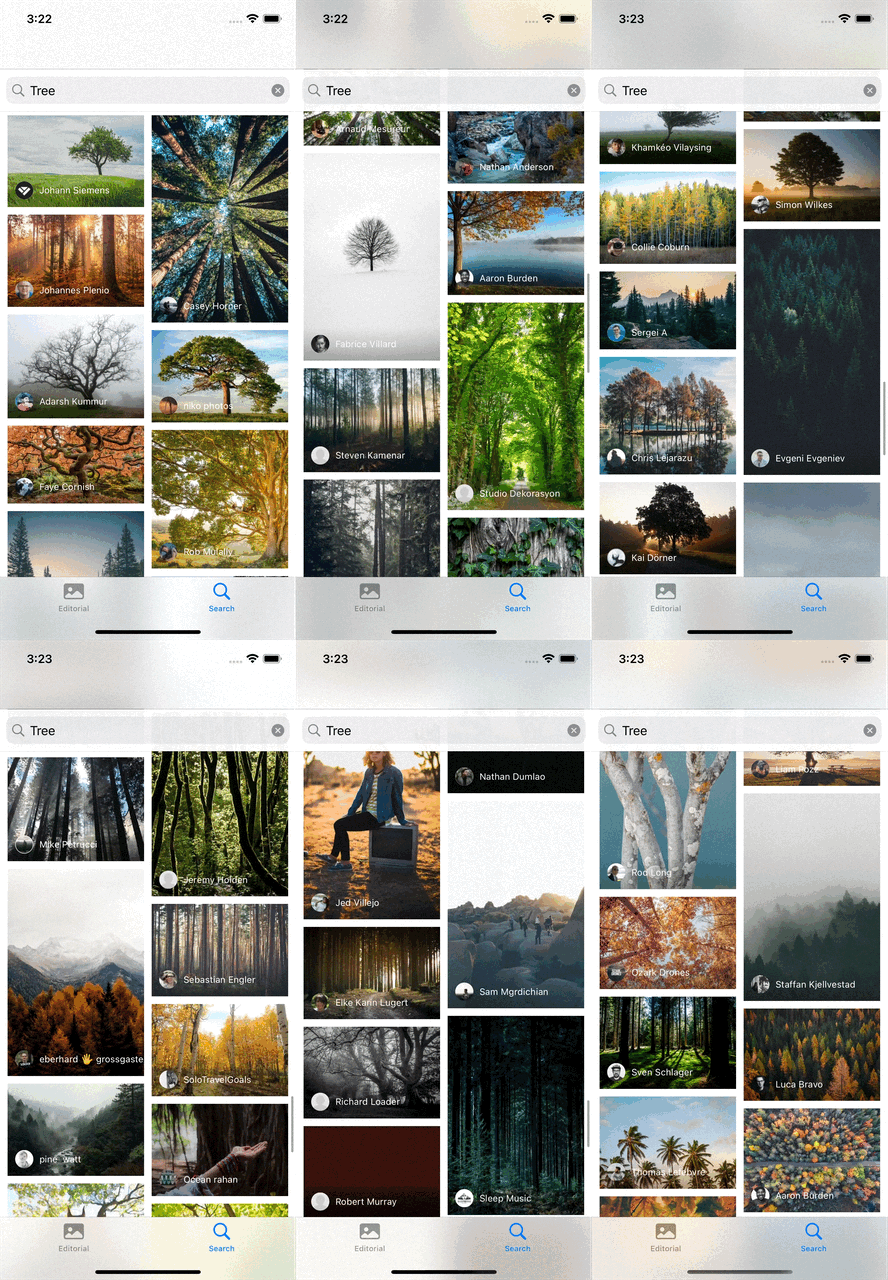
핀터레스트의 동적 셀크기의 경우 애플에서 기본으로 제공되는 Collection View Layout으로는 구현이 불가하기에 서브클래싱을 통해 핀터레스트 스타일 Collection View를 구현할 것이다.
그리고 스크롤하여 결과 추가 로딩 구현을 대비하여 추가 로드될 때 Attributes를 추가되는 부분만 계산하도록 한다.
각 Cell의 높이를 받아올 델리게이트
먼저 Collection View Layout에서 동적인 Cell 높이를 받아올 수 있도록 델리게이트 프로토콜을 생성한다. 이미지 또는 텍스트의 Aspect Ratio에 따라 계산된 높이를 데이터소스를 포함한 객체로부터 가져온다.
protocol PhotoListLayoutDelegate: AnyObject {
    func collectionView(
        _ collectionView: UICollectionView,
        heightForPhotoAtIndexPath indexPath: IndexPath
    ) -> CGFloat
}
설정을 위한 프로퍼티

var numberOfColumns = 2
var cellPadding: CGFloat = 10
Cell 여백과 열 개수를 설정한다.
계산을 위한 프로퍼티
저장 프로퍼티
// 이 델리게이트를 통해 셀의 높이를 가져올 수 있다.
weak var delegate: PhotoListLayoutDelegate?
// 매번 다시 Layout을 계산할 경우 실행이 느려지므로 Layout Attributes를 저장해둔다.
private var cache = [UICollectionViewLayoutAttributes]()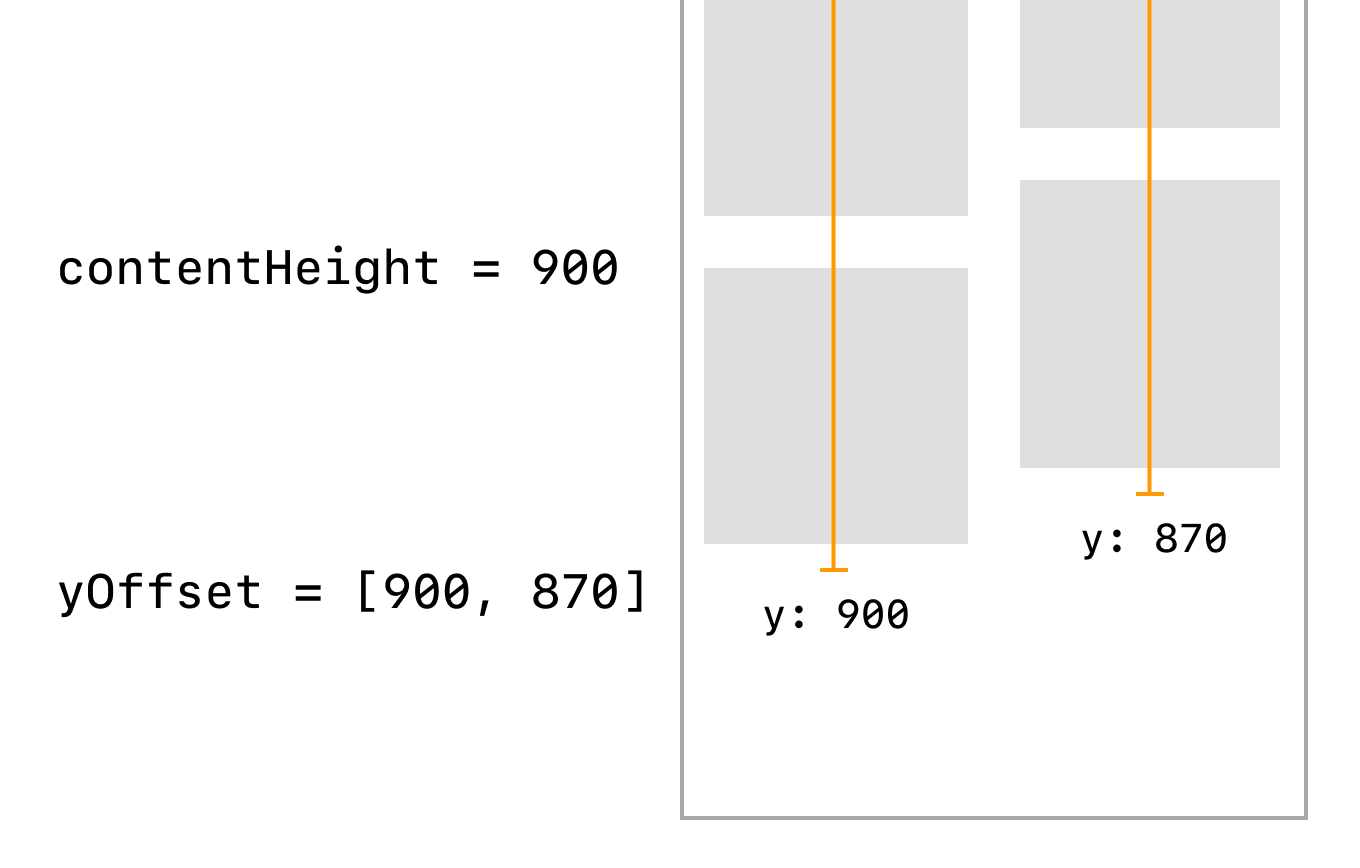
// 총 콘텐츠 높이를 저장한다. collectionViewContentSize에서 사용한다.
private var contentHeight: CGFloat = 0
// 각 열의 높이를 누적하여 저장한다. 이 값이 가장 작은 곳에 새로운 Cell을 추가한다.
private lazy var yOffset = [CGFloat](repeating: 0, count: numberOfColumns)
연산 프로퍼티
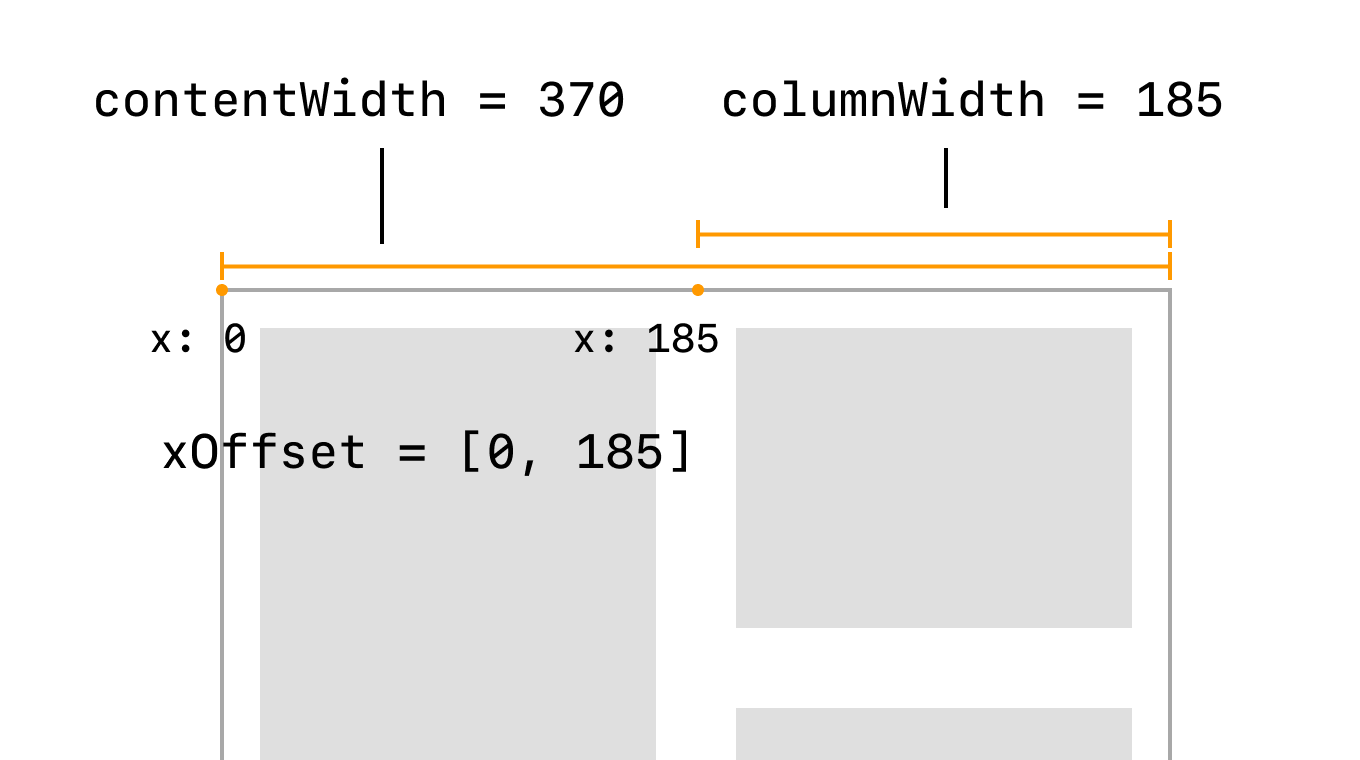
// Collection View의 Content Inset을 제외한 너비
private var contentWidth: CGFloat {
    guard let collectionView = collectionView else { return 0 }
    let insets = collectionView.contentInset
    return collectionView.bounds.width - (insets.left + insets.right)
}
// 열의 너비
private var columnWidth: CGFloat {
    contentWidth / CGFloat(numberOfColumns)
}
// 각 열이 배치될 x 좌표
private lazy var xOffset: [CGFloat] = {
    return (0..<numberOfColumns).map { column in
        CGFloat(column) * columnWidth
    }
}()
필수 구현 프로퍼티/메소드 오버라이드
override var collectionViewContentSize: CGSize {
    CGSize(width: contentWidth, height: contentHeight)
}
저장해 둔 높이값을 이용해 내부 콘텐츠 사이즈를 Collection View에 알린다. (View의 크기가 아니다)
override func prepare() {
    guard let collectionView = collectionView else { return }

    // Layout을 계산하지 않은 새로운 항목에 대해서만 계산한다.
    guard
       cache.count < collectionView.numberOfItems(inSection: 0) else {
           return
    }

    for item in cache.count..<collectionView.numberOfItems(inSection: 0) {
        let indexPath = IndexPath(item: item, section: 0)
        // 델리게이트에서 구현한 높이를 가져와서 사용한다.
        let imageHeight = delegate?.collectionView(
            collectionView,
            heightForCellAtIndexPath: indexPath
        ) ?? 200
        // Cell 사이 여백을 추가한 값을 Cell의 높이로 저장한다.
        let height = cellPadding * 2 + imageHeight
        // 높이가 제일 작은 곳에 추가하기 위해 제일 작은 값의 인덱스를 찾는다.
        let column = yOffset.enumerated().min {
            $0.element < $1.element
        }?.offset ?? 0

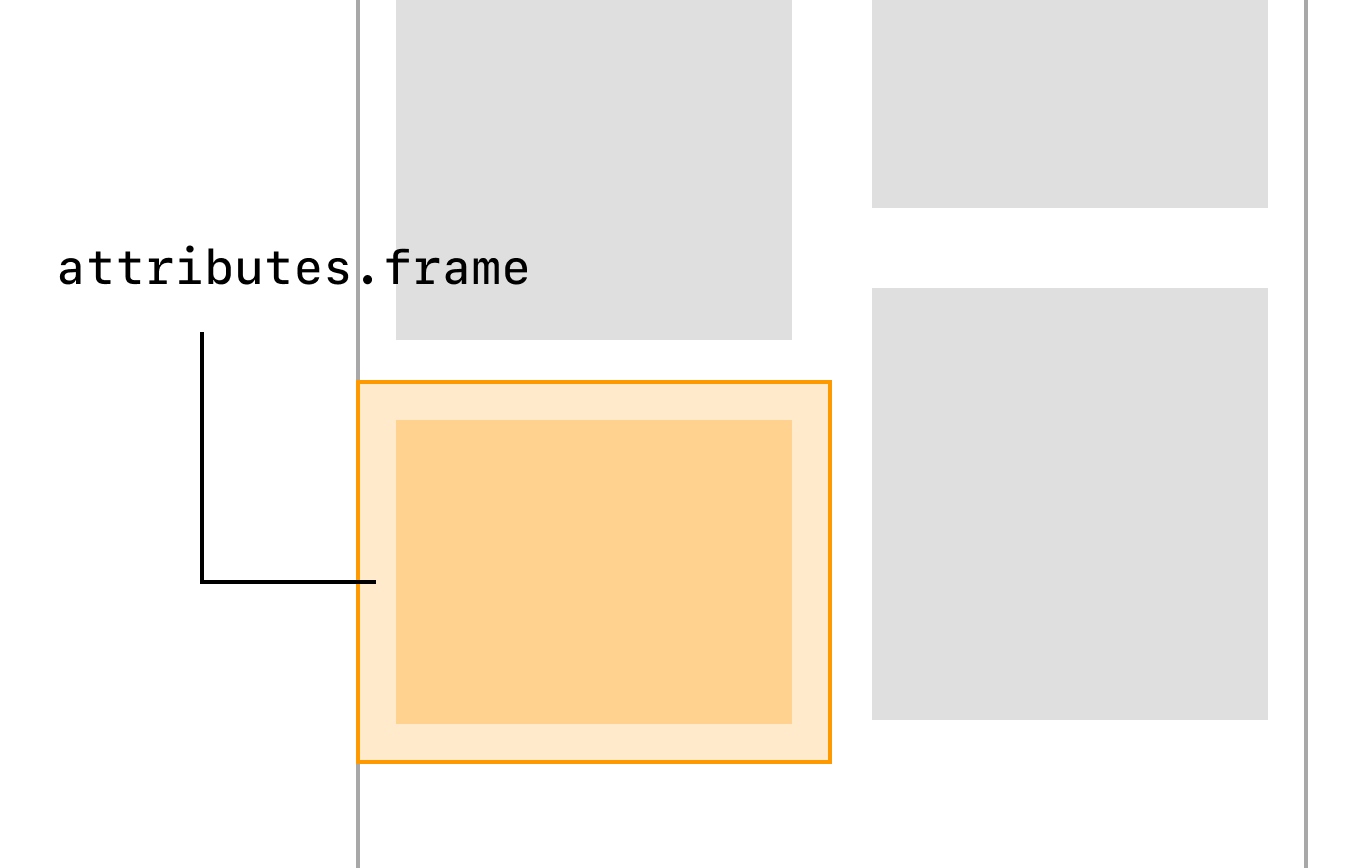
        // Cell 컨텐츠 사이즈에 여백을 추가한 값을
        // frame으로 사용해 Attributes를 생성하여 저장한다.
        let frame = CGRect(
            x: xOffset[column],
            y: yOffset[column],
            width: columnWidth,
            height: height
        )
        let insetFrame = frame.insetBy(dx: cellPadding, dy: cellPadding)

        let attributes = UICollectionViewLayoutAttributes(
            forCellWith: indexPath
        )
        attributes.frame = insetFrame
        cache.append(attributes)

        // 맨 아래 Cell이 잘리지 않도록 최대 높이를 저장해준다.
        contentHeight = max(contentHeight, frame.maxY)
        yOffset[column] += height
    }
}
화면에 그려지기 전 Layout을 계산하도록 이 메소드가 호출된다. prepare() 은 상위 클래스에서 아무 동작도 하지 않기 때문에 super.prepare()을 호출할 필요가 없다.
이 코드에선 1개의 섹션만 가지고 있다고 가정하고 섹션 인덱스는 0으로 고정한다.
// 영역의 Layout Attributes들을 반환하도록 작성
override func layoutAttributesForElements(
    in rect: CGRect
) -> [UICollectionViewLayoutAttributes]? {
    cache.filter { attributes in
        attributes.frame.intersects(rect)
    }
}
// IndexPath의 Layout Attributes를 반환하도록 작성
override func layoutAttributesForItem(
    at indexPath: IndexPath
) -> UICollectionViewLayoutAttributes? {
    guard !cache.isEmpty else { return nil }
    return cache[indexPath.item]
}
위치에 맞는 Layout Attributes를 반환하도록 구현한다.
델리게이트 메소드 작성
extension PhotoListCollectionViewController: PhotoListLayoutDelegate {
    func collectionView(
        _ collectionView: UICollectionView,
        heightForCellAtIndexPath indexPath: IndexPath
    ) -> CGFloat {
        let dataSource = // 내 데이터 소스
        guard dataSource.count > indexPath.item else { return 0 }
        let photoInfo = dataSource[indexPath.item]

        let inset = collectionView.contentInset
        let contentWidth = collectionView.bounds.width - inset.right - inset.left
        let totalPadding = self.cellPadding * CGFloat(self.numberOfColumns) * 2
        let columnWidth = (contentWidth - totalPadding) / CGFloat(self.numberOfColumns)
        let aspectRatio = CGFloat(photoInfo.height) / CGFloat(photoInfo.width)
        return columnWidth * aspectRatio
    }
}
Cell 내부에 삽입된 이미지나 텍스트 등에 따라 적절한 크기를 계산하여 반환한다. 이 코드의 경우 이미지의 비율만 사용하여 높이를 반환해준다. 그리고 Layout을 설정할 때 사용한 numberOfColumns도 해당 View Controller가 가지도록 작성했다.
'가이드' 카테고리의 다른 글
| SwiftUI에서 구글로그인 띄우기 (0) | 2022.07.30 |
|---|---|
| SwiftUI 프로젝트에서 커스텀 Scheme 또는 파일 연결 처리하기 (0) | 2022.04.13 |
| SwiftUI 커스텀 바인딩 활용하기 (0) | 2022.04.13 |
| SwiftUI fileImporter 파일선택기 사용하기 (UIDocumentPicker) (0) | 2022.04.12 |
| Multipart form-data로 파일 업로드하기 (Swift, URLSession) (0) | 2022.03.28 |